


- ✅ A travel eSIM works in Russia — it roams on Russian networks.
- ⏳ Mobile data and SMS are blocked for the first 24 hours after it registers. Calls keep working.
- 🚫 Since July 2026 a roaming eSIM no longer bypasses Russian app blocks.
- 🛂 Tourists cannot realistically buy a local Russian SIM any more.
Changelog — 15 Aug 2026: added DPI filtering of roaming traffic (10 Jul 2026) and the current shutdown picture.
Short answer: does an eSIM work in Russia in 2026?
Yes — with two limits you need to plan around. A travel eSIM registers on a Russian network (MTS, MegaFon, Beeline or T2) and gives you mobile data in Moscow, St Petersburg and every mid-sized city. But on first registration your mobile data and SMS are switched off for 24 hours — a nationwide "cooling-off" rule for foreign SIM cards in force since early October 2025. Voice calls are never blocked, and you can clear the block in minutes with a captcha on your operator's page.
The second limit is newer and matters more: since 10 July 2026 a foreign eSIM no longer gets you around Russian app blocks. Filtering now follows your physical location instead of your operator, so WhatsApp, Instagram and YouTube stay blocked even on a roaming profile. Any guide that still promises "your traffic exits abroad, so the blocks don't apply" was written before that date.
Buy before you fly. No Visa, Mastercard or Amex payment goes through inside Russia — installing an eSIM after landing is the single most common trip-planning mistake.
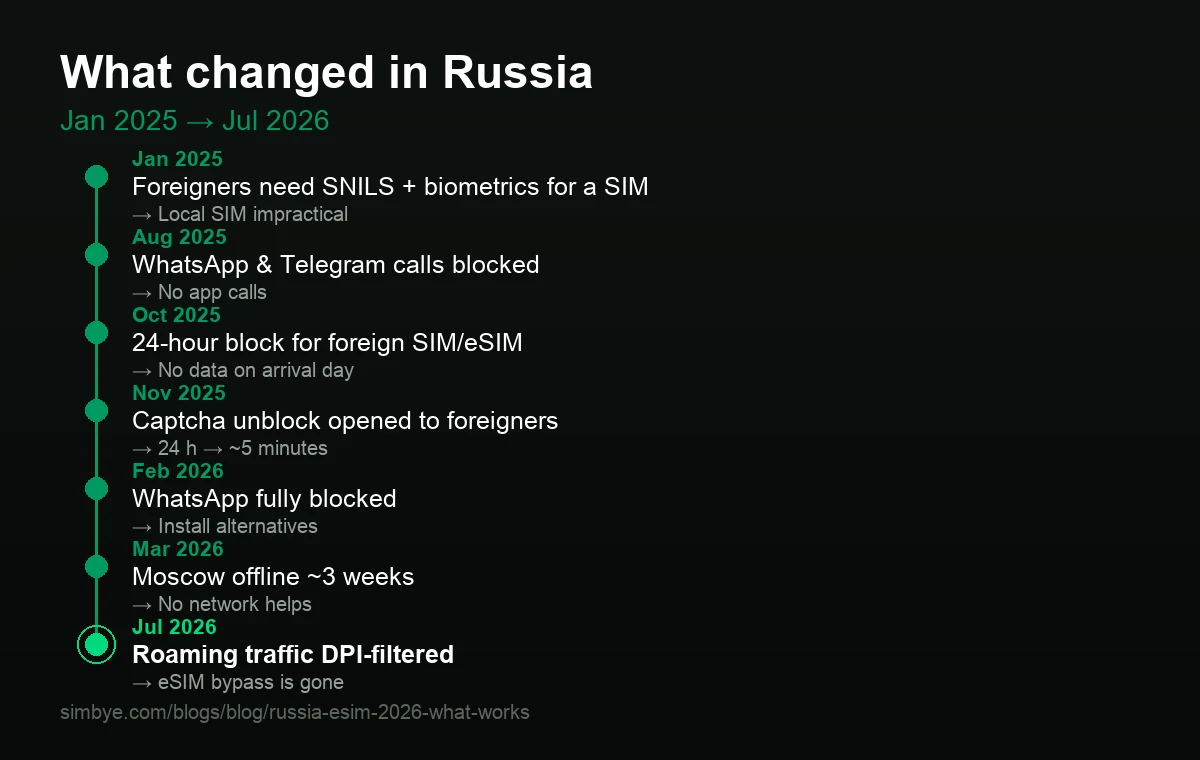
What changed, and when — the 2025–2026 timeline
Russia's connectivity rules changed more in eighteen months than in the previous decade. This is the chronology that explains why older guides are wrong:
| Date | What changed | Consequence for travellers |
|---|---|---|
| 1 Jan 2025 | Foreigners need SNILS, a verified Gosuslugi account, biometrics and IMEI binding to buy a SIM | Local SIM becomes impractical |
| 1 Jul 2025 | Enforcement cut-off for non-biometric foreign SIMs | Existing tourist SIMs deactivated |
| Aug 2025 | WhatsApp and Telegram voice calls blocked | Call home via other means |
| Sep 2025 | Whitelist of "socially significant resources" (57 sites) | Russian services stay up during outages |
| early Oct 2025 | 24-hour cooling-off block for foreign SIM and eSIM | No data on arrival day until you verify |
| 10 Nov 2025 | Extended to Russian SIMs returning from roaming | Residents affected too |
| 21 Nov 2025 | Early captcha unblock opened to foreigners | 24 h becomes ~5 minutes |
| Feb 2026 | FSB can order shutdowns without a court order | Regional outages become routine |
| 11–12 Feb 2026 | WhatsApp fully blocked | Install an alternative before you fly |
| 5–24 Mar 2026 | Moscow mobile internet down roughly three weeks | No network helps — plan offline |
| 5–9 May 2026 | Victory Day restrictions, whitelist included | Avoid relying on mobile data around parades |
| 10 Jul 2026 | Roaming traffic DPI-filtered by location | The eSIM censorship bypass is gone |
The 24-hour block on arrival — what exactly stops working
The block is triggered by the first registration on a Russian network — not by buying the eSIM, not by installing it at home. The moment your phone finds a Russian tower, a timer starts.
- Blocked: mobile data, SMS (and USSD codes on Russian SIMs).
- Working throughout: incoming and outgoing voice calls. This is your escape hatch — remember it.
- Unaffected: Wi-Fi, once you can get onto a network (see the airport catch below).
The official rationale is drone defence: SIM cards are used in drone navigation, and 24 hours is treated as the window in which an imported SIM would be used. Implementation is inconsistent — some travellers report no block at all, others a block that appears hours after landing.
The two re-block triggers most guides omit
72 hours of inactivity re-arms the block. Spend a weekend on hotel Wi-Fi with the eSIM idle, and Monday morning you are blocked again. On long train legs without coverage the same thing happens. The fix is trivial once you know it: let the eSIM register briefly each day.
Switching operator or region has also been reported to re-trigger the block (traveller reports from November 2025). This is reported, not officially confirmed — but it matters on multi-city and Trans-Siberian routes where your eSIM hops between networks.
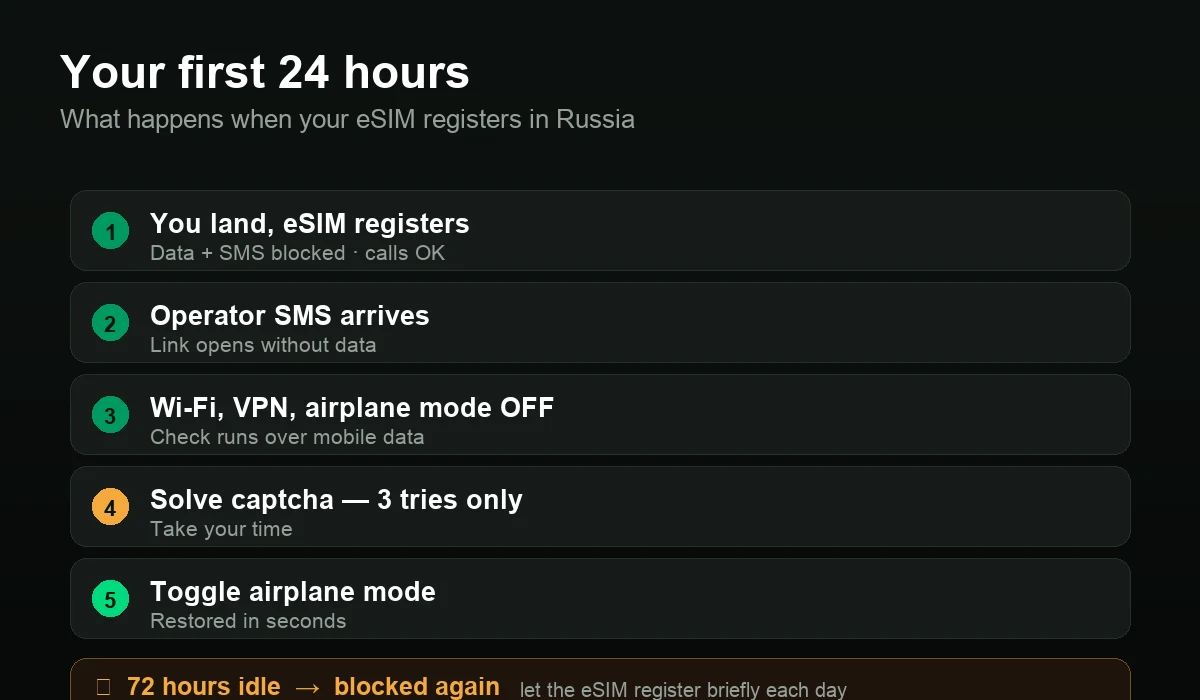
How to clear the block in minutes
You do not have to wait 24 hours. Since 21 November 2025 foreigners can verify themselves and restore access, usually within a few minutes.
- Wait for the operator SMS. It arrives bilingually in Russian and English with a verification link. The operator portal is zero-rated, so the link opens even while your data is blocked.
- Turn Wi-Fi, VPN and airplane mode OFF. The check must run over the mobile-data path, otherwise it fails.
- Open the link and solve the captcha. Usually a number sequence or a slide puzzle.
- Toggle airplane mode on and off to force re-registration.
- Access returns — typically in ten seconds to a few minutes.
You get three captcha attempts. Fail all three and you wait out the full 24 hours. Take your time on the puzzle. No Gosuslugi login and no personal data are required — Russia's digital ministry stated this explicitly.
Unblock pages and quirks per operator
| Operator | Verification page | Practical note |
|---|---|---|
| MegaFon | dostup.megafon.ru | Fastest SMS delivery in traveller reports |
| Beeline | balance.beeline.ru/unlocked | Easiest flow, EN/RU toggle — but slow SMS |
| MTS | captcha.mts.ru | Slide puzzle; the most confusing of the four |
| T2 (Tele2) | t2.ru/dostup | Straightforward |
If the verification SMS never arrives
Calls are never blocked, so verify by voice. Operator hotlines inside Russia: Beeline 8-800-700-06-11, MegaFon 8-800-550-05-00, MTS 8-800-250-08-90, T2 8-800-101-06-11. The unblock is tied to the device — do not move the eSIM to another phone afterwards, or it can re-trigger.
The airport catch-22: Wi-Fi needs an SMS, and your SMS is blocked
This is the trap that catches travellers in the first hour, and almost nobody warns about it.
Russian law (government decree No. 758) requires every public Wi-Fi operator to identify users — in practice, by sending a code by SMS. On day one your SMS is blocked. So the obvious fallback — "I'll just use airport Wi-Fi" — fails exactly when you need it.
The way out is the call-back login. Because voice calls still work, several airports let you authenticate by phone call instead of SMS. At Domodedovo you call +7 495 021 20 21; the system connects automatically and no code is needed — the airport reported that around three of four passengers use this route. Sheremetyevo offers a call-back option as well, where you enter the last four digits of your own number.
Hotel Wi-Fi is the realistic day-one fallback: staff at hotels used to foreign guests will enter their own Russian number to generate your code. Cafés and metro Wi-Fi will not do that for you.
The big 2026 change: your eSIM no longer bypasses Russian blocks
This section corrects the claim that still sits at the top of most eSIM comparison pages.
How it used to work. A roaming eSIM uses home routing: your phone attaches to a Russian tower, but the data is tunnelled encrypted to your home operator abroad and exits there. Because it left Russian territory before hitting the open internet, it sidestepped the national filtering system — which is why "use a foreign eSIM to keep WhatsApp" became standard advice.
What changed. From late June 2026, spiking on 8 July and confirmed by Russia's digital ministry on 10 July 2026, deep packet inspection now identifies blocked services inside the tunnel — by connection signatures, timing patterns and data volumes. Filtering is keyed to where the phone physically is, not to which operator issued the SIM.
If a provider still tells you that a roaming eSIM gets you around Russian censorship, that page has not been updated since July 2026.
What this means in practice. Your eSIM still gives you working mobile data — Russian services, maps, banking sites, whitelisted resources and anything that never left the Russian market run normally. What it no longer does is unblock WhatsApp, Instagram, YouTube or X for you. Coverage of the new filtering is uneven and some sessions still slip through, but you should not plan a trip around that.
What an eSIM cannot fix: regional shutdowns
Here is the part the industry does not like to print: no eSIM from any brand — ours included — helps during a regional mobile-internet shutdown. These are ordered per region and disable mobile data on every network at once.
The scale is not marginal. Shutdowns rose from 69 in May 2025 to 655 in June and 2,099 in July 2025 — more in a single month than the 296 recorded worldwide in all of 2024. In 2026 they reached the capitals: Moscow was largely without mobile internet from 5 to 24 March, St Petersburg from 9 March. Several regions run scheduled evening curfews — Krasnodar from 20:00 to 09:00, Omsk and Rostov-on-Don similar.
During the March 2026 Moscow outage, card terminals and ATMs failed, taxi apps were unusable, navigation died and shops near the Kremlin ran cash-only for two weeks.
What actually helps, since connectivity does not:
- Whitelisted services keep working — Gosuslugi, Yandex (Go, Maps, Navigator), VK, Ozon, Wildberries, major banks. Travellers during the outages reported Yandex Go, Navigator, Ostrovok and the railway app all still functioning.
- Download offline maps before you travel. Yandex Maps offers full offline city packs with routing and address search.
- Carry cash — 15,000–25,000 ₽ for the first days. When mobile data dies, so do the payment terminals.
- Screenshot everything — bookings, addresses, confirmation numbers, map sections.
A travel eSIM gives you data, not a Russian number
This is the second honest limit. A travel eSIM is data roaming on a foreign number. Anything gated behind a +7 will not verify:
- Yandex Go, Yandex Eats and other Yandex services requiring SMS confirmation
- Russian railway (RZD) ticket purchases
- Ozon, Wildberries and Russian banking apps
- SMS-verified public Wi-Fi
Workarounds that do work: create a Yandex account by email on yandex.com before you travel and sign in with it in the app; use the in-app driver chat instead of a phone call; order in the app and pay the driver in cash on arrival, since a foreign card cannot be stored.
To be straight with you: a virtual US or UK number does not solve this either. It is useful for keeping a second reachable line while abroad — it will not unlock Yandex, RZD or Russian banking, because those need a genuine +7.
Which networks you get — and why "5G" claims are wrong
Russia has no commercial 5G network. As of 2026 no operator has launched consumer 5G — the spectrum needed sits with the military. Travellers get 4G/LTE everywhere it is available, regardless of what a provider's marketing says. Any Russia eSIM advertised as "5G" is selling you a label, not a technology.
Coverage in practice: dense LTE in Moscow, St Petersburg, Kazan, Sochi and along the main corridors. The Trans-Siberian route is intermittent — expect long stretches with nothing. Away from settlements in Siberia and the far north, no operator has coverage at all.
Why you must buy before departure
Visa, Mastercard, Maestro, Amex and JCB issued outside Russia have not worked there since 2022, and foreign UnionPay cards are unreliable. There is no Apple Pay or Google Pay for foreign cards.
That has a direct consequence: you cannot reliably buy or top up an eSIM once you are inside Russia. You would need working internet you may not have during the first 24 hours, access to provider sites that may be restricted, and a payment method that will decline. Buying and installing the profile at home — where the download works — is the only dependable route.
Simbye Russia eSIM — data plans from 1 GB / 7 days up to 50 GB / 180 days, plus unlimited options. Instant QR delivery by email and in the app, no contract, no Russian paperwork.
Top-ups run from outside Russia through the app wallet, which is exactly what you need when local payment fails.
Your before-you-fly checklist
- Buy and install the eSIM at home. The profile download needs internet. Install it, then leave the line switched off until you land.
- Install a VPN before departure — VPN apps have been removed from the Russian app stores. Note the conflict: with a VPN on, Russian services like Yandex Go and banking apps may refuse to work, so you will be toggling it.
- Create a Yandex account by email on yandex.com, so you are not stuck at an SMS prompt.
- Download offline maps and an offline translation pack.
- Bring cash and exchange 20,000–30,000 ₽ early. Notes must be clean and undamaged — Russian banks reject creased or marked bills.
- Screenshot your bookings, addresses and the operator unblock links from this page.
- Note the hotline numbers above, in case the verification SMS never arrives.
Frequently asked questions
Does eSIM work in Russia in 2026?
Yes. A travel eSIM roams on MTS, MegaFon, Beeline or T2 and works across Russian cities. Two limits apply: mobile data and SMS are blocked for the first 24 hours after it registers on a Russian network, and since July 2026 the eSIM no longer bypasses Russian app blocks.
Why is my eSIM not working in Russia?
Almost always the 24-hour cooling-off period, which starts on first registration and blocks data and SMS while leaving voice calls working. Open the link in the operator SMS with Wi-Fi, VPN and airplane mode switched off, solve the captcha, then toggle airplane mode. If it worked before and stopped, the line was probably idle for more than 72 hours and was blocked again.
How do I unblock mobile internet in Russia faster than 24 hours?
Open your operator's verification page — MTS captcha.mts.ru, MegaFon dostup.megafon.ru, Beeline balance.beeline.ru/unlocked, T2 t2.ru/dostup — with mobile data as the active path and no VPN. Solve the captcha; access usually returns within ten seconds to a few minutes. You have three attempts, and no Gosuslugi login or personal data is needed.
What if the verification SMS never arrives in Russia?
Voice calls are never blocked, so call your operator's Russian hotline and verify by phone: Beeline 8-800-700-06-11, MegaFon 8-800-550-05-00, MTS 8-800-250-08-90, T2 8-800-101-06-11. The unblock is tied to the device, so do not move the eSIM to a second phone afterwards. If nothing works, the block expires by itself after 24 hours.
Will my eSIM be blocked again if I don't use it for a few days?
Yes. After roughly 72 hours without any activity on a Russian network the 24-hour block is applied again. On trips where you spend days on hotel Wi-Fi, or on long train legs without coverage, let the eSIM register briefly each day to avoid it.
Does a Russia eSIM give me a Russian phone number?
No. A travel eSIM is data roaming with a foreign number, so anything gated behind a +7 — Yandex Go, RZD tickets, Ozon, Russian banking apps and SMS-verified public Wi-Fi — will not verify. Create a Yandex account by email before you travel, use the in-app driver chat and pay in cash.
Is WhatsApp blocked in Russia in 2026?
Yes. WhatsApp has been fully blocked since 11–12 February 2026, and WhatsApp and Telegram voice calls have been blocked since August 2025. Since July 2026 this applies on a foreign roaming eSIM as well, because filtering follows your physical location rather than your operator.
Can tourists buy a local SIM card in Russia in 2026?
Realistically no. Since 1 January 2025 a foreigner needs a SNILS number (which requires a notarised passport translation), a verified Gosuslugi account, in-person biometric registration and the SIM bound to the phone's IMEI. That takes days and documents a short-stay visitor does not have, which is why a pre-purchased travel eSIM is the standard route.
What happens to my eSIM during a regional mobile internet shutdown?
Nothing you can fix. Shutdowns are ordered per region and disable mobile data on every network, foreign eSIMs included; only whitelisted Russian services such as Gosuslugi, Yandex, VK and major banks stay partly reachable. Voice and SMS usually keep working and Wi-Fi is unaffected — download offline maps and carry cash, because card terminals fail too.
Can I buy an eSIM after I arrive in Russia?
It is risky and often impossible. Buying requires internet you may not have in the first 24 hours, many provider sites and app stores are restricted, and no Visa, Mastercard or Amex payment goes through inside Russia. Buy and install before departure — the profile download needs a working internet connection.
Sources and verification
This guide is based on operator announcements, Russian government statements and dated traveller reports. Key references: Russia's digital ministry (Mintsifry) statements on the cooling-off rule and roaming filtering (Oct 2025, Jul 2026); operator verification pages of MTS, MegaFon, Beeline and T2; Human Rights Watch reporting on shutdown escalation (Mar 2026); The Moscow Times and Meduza reporting on the Moscow and Victory Day restrictions (Mar–May 2026); airport Wi-Fi authentication information from Domodedovo and Sheremetyevo.
Rules in Russia change quickly. We re-check this page regularly and date every change in the box at the top. If you find something that no longer matches reality on the ground, tell us and we will correct it.

Comments (0)
Leave a Comment